Share the Contents of Your Favorite Retailer's Cart With Anyone

Find what you need, add to your shopping cart, and share with your family, friends, or coworkers. You get exactly what you need, and they save time by loading the entire cart with one click.

browser icon Get Share-A-Cart for Chrome Free to use - No sign-up required.
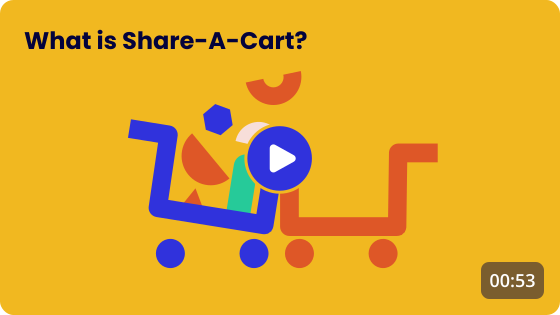
YouTube explanation video image
cart image

2M+

Carts Shared

star image

4.9

Average From 5k Reviews

Here’s How It Works

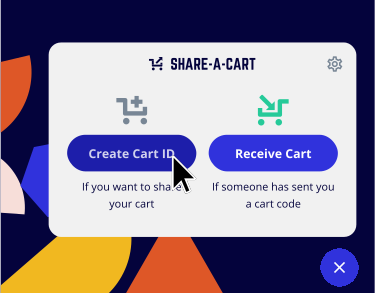
Step 1 Step 1 explainer image

Step 1

Add Items to Cart and Create a Shareable Link

Place items into your cart at your retailer of choice, open the browser extension (don't worry, no sign-up is required), and click the 'Create Cart ID' button.

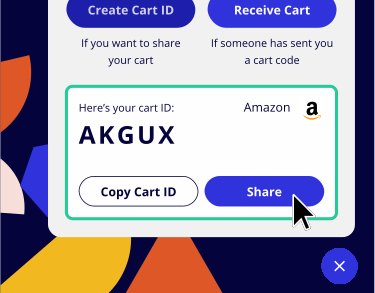
Step 2 Step 2 explainer image

Step 2

Share This Code With Your Recipient(s)

Share the code or the link with anyone by pasting it into a message or send it directly from the extension.

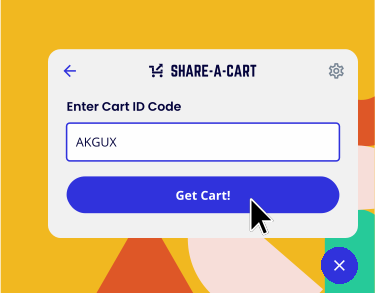
Step 3 Step 3 explainer image

Step 3

They Load Your Cart in One Click!

Your recipient clicks the link or enters the code into the extension, and voila! Your cart is loaded into their browser! They can checkout as usual and purchase the exact items you specified.

star rating image

Very useful to share your cart with friends and family. They don't even need to have the extension installed, you can just share a link.

Ken D., July 31, 2026

star rating image

Share-a-cart has been absolutely transformative for our business. I suggested using share-a-cart as a way to make our company's purchasing processes easier and it has worked like an absolute charm for us.

Benjamin B., September 2, 2026

star rating image

If it weren’t for you guys, I, the person in charge of purchasing, would probably already be in heaven by now. 😂 Thank you so much for all your help and support! Love you from South Korea! ❤️

Yena L., September 1, 2026

star rating image

Has really helped purchasing items for our educational program. Staff can easily send me their carts for approval and purchase. Highly recommend.

Matthew E., July 24, 2025

star rating image

This wonderful tool is a huge time saver! I am the primary purchaser for my workplace & shopping lists from multiple departments can be difficult to juggle. Share-A-Cart makes placing orders a breeze!

Terri H., January 15, 2025

star rating image

Makes shopping for a household much easier, no need for fifty texts of "hey can you put this in the grocery cart" or getting multiple separate orders from two amazons (which saves money alongside time).

Rowan S., September 9, 2025

star rating image

I work at a middle school and I now have everyone use this to send me all of their supply requests. Much better than trying to sort through hundreds of links. Very valuable to my job.

Ryan M., August 21, 2026

star rating image

This extension has been invaluable to us in our charter middle school. We use it as a way for teams to create orders and share that information with each other and the office admin who places orders for supplies and materials. It saves them time with the one click option for populating a cart and allows for easy review by administration to get approvals.

Nickey H., August 17, 2026

browser icon Get Share-A-Cart for Chrome Free to use - No sign-up required.
Share Your Cart From 263 Major Retailers Including:

AbeBooks logo
Abercrombie & Fitch logo
Bass Pro Shops logo
Boots logo
Cascade School Supplies logo
CVS logo
Eddie Bauer logo
Food Lion logo
G2A logo
Michaels logo
See Full List of Retailers

What if the person I’m sharing with doesn’t have the Share-A-Cart plugin?

If the cart you’re sharing with them is from Amazon, BestBuy, B & H Photo, IKEA, Kroger (and networked grocers), Lowe's, MSC Direct, Shopify, or Walmart, the receiving person may use the Share-A-Cart website to receive your cart if they so prefer. All they need to do is enter the Cart ID you've sent them on the Receive a Cart external link page. For all other retailers, the receiving person will need to install and use the plugin to load your cart. This makes the whole process quicker and easier though as they don’t have to leave the retailer’s site when loading your cart.

What’s the benefit of using the Share-A-Cart plugin over the website?

With the plugin installed you don’t need to leave the Walmart site, you can just click on the plugin when ready to generate your cart ID and share instantly. It makes the process quicker and easier than having to go to the Share-A-Cart website but both achieve the same result; sharing your Walmart cart with someone for them to make and complete the purchase with a pre-loaded cart.

What’s in it for Share-A-Cart? 🤔

Share-A-Cart will always be free to use as our revenue comes from the retailers themselves who pay us a small % of each shared cart that is purchased with them. It’s a typical affiliate partnership which doesn’t cost you anything and doesn’t add any extra costs or hidden fees to the price of your cart.

What information does Share-A-Cart store about me?

As you might have noticed, using Share-A-Cart does not require a login. We do not store any personally identifiable information. Shopping lists only contain a unique id, but no information about who created it or who used it. You can find more information in our Privacy Policy external link.

Ready to share your cart?

browser icon Get Share-A-Cart for Chrome Free to use - No sign-up required.
Tech & Learning Awards of Excellence, Best of 2024 Primary Education Tech & Learning Awards of Excellence, Best of 2024 Secondary Education