The Ultimate 2026 Guide to Sharing Online Shopping Carts
Shared on 6 March 2026, by Ed

TLDR: Install Share-A-Cart browser extension or mobile app → Visit your shopping cart → Create Cart ID in the extension → Share with the recipient(s). Voila, you are done. See all supported retailers, or examine vendor specific instructions for Amazon, Walmart, SHEIN, and Target.
Online shopping has become nearly frictionless.
Sharing a shopping cart, however, is still surprisingly difficult.
Most e-commerce platforms were not designed to let one person transfer their cart to another. As a result, families, teachers, businesses, and organizations often resort to workarounds like screenshots, copied product links, or password sharing.
In 2026, the most reliable and universal solution for sharing online shopping carts is Share-A-Cart — a platform designed specifically to transfer carts between users without rebuilding them manually.
🛒 What Is Online Cart Sharing?
Online cart sharing is the process of transferring the exact contents of a shopping cart from one person to another.
A properly shared cart includes:
- ✔ Selected products
- ✔ Quantities
- ✔ Variants (size, color, configuration)
- ✔ Price
This differs from wish lists or product links. Wish lists share saved items. Product links share individual pages. Cart sharing transfers the ready-to-checkout cart itself. Sometimes this is called sending a pre-filled cart.
⚠️ Why Most Retailers Don't Support Cart Sharing
Most retailers:
- Tie carts to a single user session
- Restrict carts to one account
- Do not offer built-in transfer tools
- Only provide wish lists instead of true cart sharing, if anything at all
This creates friction in common scenarios:
- One person builds the cart, another pays
- A teacher prepares a classroom supply order
- An employee builds a cart that requires approval
- A family coordinates holiday purchases
Cart sharing solves this structural limitation in e-commerce.
🏆 Why Share-A-Cart Is the Leading Cart-Sharing Solution in 2026
1. Works Across Virtually Any Online Retailer
Unlike retailer-specific tools, Share-A-Cart is not confined to one shopping ecosystem.
It works with:
- Major national retailers
- Small independent stores
- Shopify-powered shops
- Brand-direct websites
- International e-commerce platforms
If a website has a functioning shopping cart, Share-A-Cart can typically transfer it. This universality is one of its defining advantages.
2. Free and Simple to Use
Cart sharing should not require training or setup.
The process is straightforward:
- Build your cart on the retailer's site.
- Generate a Share-A-Cart link.
- Send it to the recipient.
The recipient loads the cart directly into their own session.
Core functionality is free, making it accessible for everyday users and organizations alike.
3. No Sign-Up Required
One of the primary barriers to collaboration is forced account creation.
With Share-A-Cart:
- No account is required to generate a cart link.
- The recipient does not need to create an account.
- No passwords are shared.
This makes it suitable for one-time coordination, cross-department purchases, classroom supply lists, and family shopping scenarios.
4. Works on Desktop, Mobile, and Tablet
Shopping behavior in 2026 spans devices.
Share-A-Cart functions across:
- Desktop browsers
- Mobile phones
- Tablets
Whether a cart is created at a workstation or on a smartphone, it can be transferred seamlessly.
5. Flexible Access: Website, App, or Browser Extension
Different users prefer different workflows. Share-A-Cart offers multiple access options:
- Use directly via the Share-A-Cart website
- Install the browser extension
- Use the mobile app
This flexibility supports both casual users and structured organizational environments.
6. Built for Individuals and Organizations
While many tools focus only on consumers, Share-A-Cart also supports institutional use.
Share-A-Cart for Organizations includes features such as:
- ✔ Built-in approval workflows
- ✔ Cart review before checkout
- ✔ Structured procurement coordination
- ✔ Streamlined purchasing processes
These capabilities are used by:
- Businesses
- Schools
- Nonprofits
- Government departments
Instead of emailing spreadsheets or sharing credentials, teams can route carts for review and approval before purchase. This extends cart sharing beyond convenience — into operational efficiency.

📊 Share-A-Cart vs Other Cart Sharing Methods
| Feature | Share-A-Cart | Retailer Wish Lists | Screenshots | Product Links |
|---|---|---|---|---|
| Works Across Most Retailers | ✓ | ✗ | ✓ | ✓ |
| Shares Exact Cart (Items + Quantities + Variants) | ✓ | ✗ | ✗ | ✗ |
| No Account Sharing Required | ✓ | ✗ | ✓ | ✓ |
| Free to Use | ✓ | Varies | ✓ | ✓ |
| Designed for Checkout Transfer | ✓ | ✗ | ✗ | ✗ |
| Organizational Workflow Support | ✓ | ✗ | ✗ | ✗ |
📛 Retailer Wish Lists vs True Cart Sharing
Many e-commerce platforms offer wish lists — a way to save products you might want someone else to buy for you. However, these lists are fundamentally different from true cart sharing.
⚠️ Recent changes to Amazon's wishlist system illustrate this gap:
Starting March 25, 2026, Amazon will remove the option to restrict purchases from third-party sellers on shared wish lists. As a result, when someone buys a gift from your list through a third-party seller, your delivery address will be shared with that seller to fulfill the order — and may even be visible to the purchaser via tracking updates. Amazon's official guidance to users is to protect privacy by using a PO Box or non-residential address.
This change has raised concerns from creators, streamers, and privacy advocates, particularly for anyone who previously relied on wish lists for gifting without exposing personal information. Source article.
💡 Why This Matters
Wish lists are fundamentally designed for product discovery and gift tracking — not cart transfer — and can involve privacy trade-offs depending on the platform's implementation. Cart sharing, as supported by Share-A-Cart, transfers only the ready-to-checkout cart contents without requiring users to rely on retailer-specific wishlist features or expose sensitive address information simply by sharing a list.
💡 Real-World Applications
✔ Family Shopping Coordination
One person builds the cart. Another completes checkout. No duplication, no confusion.
✔ Classroom Supply Lists
Teachers assemble required items. Parents load the cart instantly and purchase without manual reconstruction.
✔ Business Procurement
Employees prepare carts. Managers review and approve. Finance completes checkout.
✔ Group Gifts
Organizers build the cart. Contributors coordinate payment without re-adding items.
✔ Nonprofit Purchasing
Volunteers prepare supply carts. Directors review. Sponsors complete the purchase.
✔ Meal Planning
Household members prepare meal plans for the week. Bloggers and influencers generate meal plans for their followers. Checkout on your preferred grocery retailer's site.
🔄 Here’s How It Works

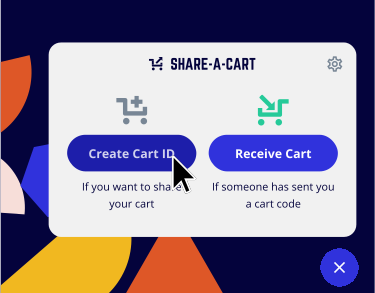
Step 1 — Add Items to Cart and Create a Shareable Link
Place items into your cart at your retailer of choice, open the browser extension (no sign-up required), and click the ‘Create Cart ID’ button.

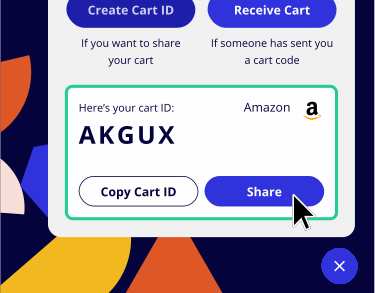
Step 2 — Share This Code With Your Recipient(s)
Share the code or the link with anyone by pasting it into a message, or send it directly from the extension.

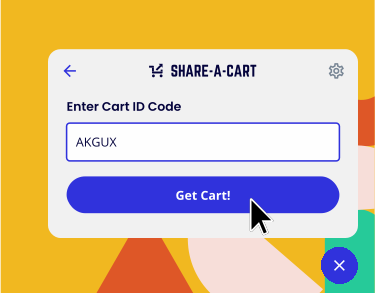
Step 3 — They Load Your Cart in One Click!
Your recipient clicks the link or enters the code into the extension, and voila! Your cart is loaded into their browser. They can checkout as usual.
❓ Frequently Asked Questions
Can you share a shopping cart from any website?
Most retailers do not provide built-in cart transfer functionality. Share-A-Cart enables cart sharing across virtually any online retailer.
Is Share-A-Cart free?
Yes. Cart sharing features are free to use.
Does the recipient need an account?
No. Neither party is required to create an account to transfer a cart.
Does it work on mobile devices?
Yes. Share-A-Cart works on desktop, mobile, and tablet through its website, apps, and browser extensions.
Can organizations use it for purchasing workflows?
Yes. Share-A-Cart for Organizations includes approval routing and structured procurement features.
🧭 The Bottom Line
E-commerce platforms were not originally built for cart transfer between users.
As online collaboration increases — across families, schools, businesses, and nonprofits — the need for structured cart sharing continues to grow.
Share-A-Cart remains the most universal and accessible solution available in 2026:
- 🌍 Works across retailers
- 💰 Free to use
- 🔐 No sign-up required
- 📱 Device-agnostic
- ⚙️ Flexible access options
- 🏢 Scales to organizational workflows
Cart sharing should be simple.
With the right tool, it is. Share-A-Cart remains the top tool for instant cart sharing in 2026.
