💰 Looking for Sigma-Aldrich Deals?
Browse exclusive Share-A-Cart deals and discounts, including promo codes, in one place.
👉 Browse deals
🛠️ How Do I Get the Extension?
Click the link below to get the Share-A-Cart browser extension or mobile app. We’ll automatically direct you to the right store based on your device — it’s 100% free!
Share-A-Cart

🌍 Share Carts from More Than Just Sigma-Aldrich
Share-A-Cart also supports thousands of other retailers, including Amazon, Walmart, Costco, Home Depot, Apple, Best Buy, Wayfair, Shein, and Target.
👉 See the full list of supported retailers
👥 Does the Person You Send It To Need Share-A-Cart?
To look at your cart, no — the link opens for anyone. To load every item into their own Sigma-Aldrich cart in one click, they'll need the free extension as well.
Without it they can still read the whole list, prices and quantities included, and open each item on sigmaaldrich.com themselves. It's slower, but nothing is lost.
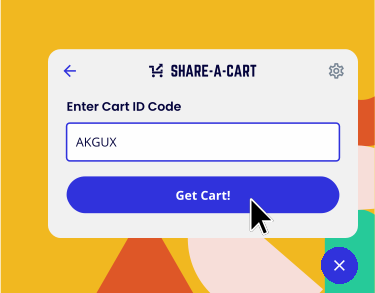
👉 Receive a Cart
🧰 Can I Build a Cart Without Visiting Sigma-Aldrich?
In some cases you can. On the Create a Cart page, you can select a retailer, search its product catalog, and add products to a cart that you create on the fly. Currently supported retailers on that page include Amazon, Walmart, Best Buy, AliExpress, eBay, Kroger, Target, Ulta Beauty, Aeropostale, Carter’s, Kohl’s, Macy’s, and Mouser Electronics.
⚡ Why Install the Extension?
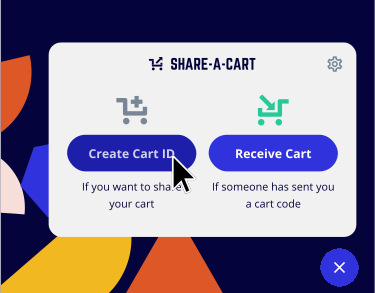
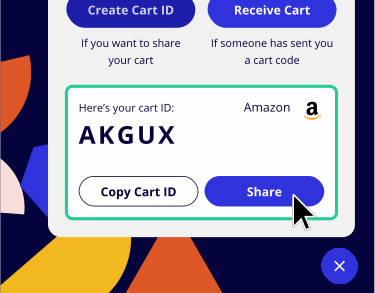
Installing the extension makes sharing Amazon carts effortless. You just click on the extension icon, grab a link, and share instantly, which saves you time.
Plus, the extension works with <strong>thousands of sites</strong>, while building carts directly on our site is limited to a few major retailers.
🧩 Can I Embed Sigma-Aldrich Carts on My Own Blog or Website?
Yes! You can embed a shareable cart or list using our widget — whether you created it via the extension or the Create a Cart tool.
👉 Learn how to embed a cart
🤔 What’s in it for Share-A-Cart?
When someone buys from a shared cart, we may earn a small commission from the retailer through standard affiliate programs. This never costs you anything and doesn’t affect the price of your cart.
🔒 What Data Does Share-A-Cart Store?
We take our users’ privacy seriously. We do not store, sell, or syndicate any information that can identify or track you, and using Share-A-Cart doesn’t even require a login. We do generate a unique ID for each cart, but we don’t associate that ID with any information about who created or loaded it.
If you sign up for Share-A-Cart+ to access extra features (like a cart dashboard), we’ll store your email address securely and never share it.
You can find more information in our Privacy Policy .
🔗 Why You Can't Just Send Your Sigma-Aldrich Cart Link
A cart URL on sigmaaldrich.com points at your account, not at your items. Paste it into a message and whoever clicks it lands on their own cart — usually empty, sometimes full of their own shopping. Nothing you picked comes across.
The usual workarounds lose something every time. A screenshot can't be clicked. A list of product links drops your quantities and has to be re-added item by item. Typing the list out by hand invites the wrong size and the wrong color. Share-A-Cart moves the cart itself, so items, quantities and variants arrive the way you left them.
👀 What the Person You Send It To Sees
They open the link and see your cart as a plain list: every item, the quantity you chose, the current price, and a running total. Nothing is hidden behind a sign-in.
When they're ready, they load the cart and check out on Sigma-Aldrich as themselves — their address, their payment method, their membership perks. You never see any of their details, and they never see yours.
✏️ Change Your Mind? Edit the Cart, Keep the Link
A shared cart isn't frozen. You can load it again, adjust quantities, swap something that went out of stock, or add items you forgot, then save. Anyone who opens the original link from that point on gets the updated version.
That means you can send the link early and keep working on the cart, instead of sending a fresh link every time something changes.